

Discover Ford SYNC Features — Advanced Tech Unleashed
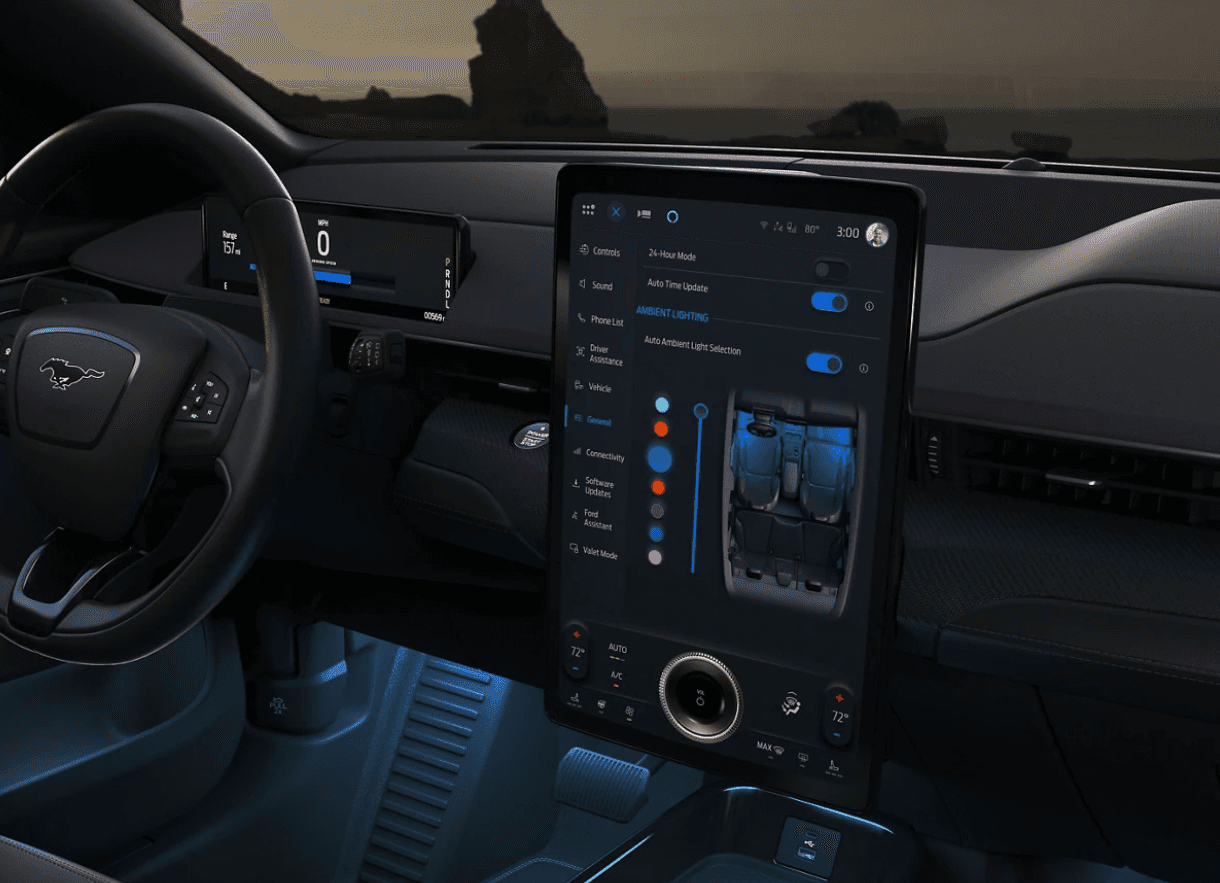
Ford and Microsoft teamed up in 2007 to create SYNC, a system that made navigation and phone calls hands-free. With time, it’s become better at voice control, communicating with apps, and providing in-car Wi-Fi to make your connected experience behind the wheel better.
Ford’s SYNC 4 tech boasts upgraded voice recognition with AI improvements, wireless Apple CarPlay and Android Auto, over-the-air updates, and split-screen support. With its intuitive touch screen, cloud-based navigation, and seamless smartphone integration, your drives around Dallas, Texas, will be more connected.
Key Features of Ford SYNC
Ford SYNC makes driving easy while keeping you connected. You won’t have to move your eyes away from the road ahead using SYNC with voice-activated navigation and hands-free calling. SYNC offers a driving experience that’s more in tune with the times with cloud-based updates, voice recognition, and seamless smartphone integration.
Seamless Phone Connectivity: Hands-Free Calling and Messaging
SYNC lets you make calls and send messages without taking your hands off the wheel. Using simple voice commands, you can connect with contacts, dictate text messages, and listen to incoming messages. Apple CarPlay and Android Auto integration make it even easier to sync your smartphone for a smooth experience. You can also access apps such as WhatsApp and Google Messages through SYNC, ensuring you stay connected safely.
Easy Route Finding: Advanced Navigation and Traffic Updates
With the help of TomTom and AccuWeather, you’ll get accurate traffic updates, weather forecasts, alternate routes, navigation features, and much more. To make life easier, it keeps track of places you visit often and recommends routes according to your driving patterns.
Flexible Entertainment Options: Music, Podcasts, and More
You can listen to your music, podcasts, and audiobooks on SYNC. The system works with Bluetooth audio, SiriusXM, Spotify, and Pandora smartphone apps. The large touch screen and voice commands make selecting media while driving a cinch. This flexible dashboard makes it easy to get to your frequently accessed sites and apps.
Enhanced Voice Activation: Controlling Your Vehicle With Commands
Ford SYNC uses enhanced voice recognition to let you control various features without touching a button. Control climate settings and radio stations or get directions with just your voice. The cloud-based system learns what you like over time and refines its responses based on your voice commands, offering a personalized driving experience.
Straightforward Online Access: In-Vehicle Wi-Fi and Data Plans
SYNC enables you to access a Wi-Fi hot spot on the go. Passengers can enjoy their road trip as it allows up to 10 devices. Also, it can receive over-the-air updates so that you have the latest technology available. With in-car Wi-Fi, you can stream music, use navigation, and keep passengers entertained.
Convenient Integration With Smart Technology: Alexa and Google Assistant
You can now enjoy extra convenience thanks to SYNC’s compatibility with Google Assistant and Amazon Alexa. Control devices in Smart Home with Alexa, listen to songs, check weather updates, and more from your car. Google Assistant has similar functions, allowing you to stay connected while keeping your hands on the wheel. You can even set reminders or schedule appointments with your voice and save time on other tasks.
SYNC Variants and Their Features
The latest SYNC 4 builds on the foundation of SYNC 3, adding more processing capability, wireless connectivity, and improved voice control.
Ford SYNC 3 vs. SYNC 4: What’s the Difference?
SYNC 4 is a significant step up from Ford’s SYNC 3 features. With twice the computing power, it’s faster and more responsive. You can enjoy wireless Apple CarPlay and Android Auto connectivity with SYNC 4, which wasn’t the case with SYNC 3. This means you can connect to your favorite apps without needing to plug in your phone.
Voice control has also improved. SYNC 4, as compared to SYNC 3, understands your speech in a more natural way, which means that you can ask for directions, play music, and more without having to memorize exact phrases. For instance, all you have to say is “I need gas” instead of “Find the nearest gas station,” and SYNC 4 will show results.
The built-in navigation system, powered by TomTom, provides real-time traffic, weather, and parking updates — features that require a subscription in the case of SYNC 3.
Another major advantage of SYNC 4 is over-the-air updates. SYNC 4 doesn’t need to connect to your phone via USB or Wi-Fi for software updates like SYNC 3. The new system will automatically download and install updates over the air.
Vehicles Featuring the Latest SYNC 4 Technology
Many new Ford models come equipped with SYNC 4, bringing smarter technology to a variety of vehicles:
- 2023 Ford F-150
- 2024 Ford Escape
- 2023 Mustang Mach-E
- 2024 Ford Bronco
- 2024 Ford F-150 Lightning
- 2024 Ford Edge
- 2024 Ford Expedition
- 2024 Ford Ranger
- 2024 Super Duty
SYNC 4 is changing the game of in-car technology while keeping you connected and updated.
Updating Your Ford SYNC
To get the latest features and enhancements, you should keep your Ford SYNC updated. You can do this using a USB drive or Wi-Fi. Regular updates improve performance, fix issues, and enhance functions.
Using a USB Drive for Updates
To use a USB drive to update your Ford’s SYNC, follow these steps:
- Head over to Ford’s website, input your car’s details, and save the update onto your computer.
- Save the file to a blank USB drive, then unzip the file you just downloaded.
- Plug your USB into your SYNC system and follow the instructions that come up on the screen.
- Restart your vehicle to complete the process.
Doing Over-The-Air Updates via Wi-Fi
You can update SYNC over the air via Wi-Fi as follows:
- Find your SYNC version in the settings on the menu.
- Ensure that you connect your automobile to a Wi-Fi network that works well.
- Follow the prompts on your SYNC screen to complete the update.
- Restart your vehicle and check for new features.
Resetting Your Ford SYNC System
If your SYNC system isn’t working properly, a reset can help. You can do this by either of these methods:
- Push and hold the Power Button and Seek Right button for 10 seconds.
- Hold the Volume Down and Seek Right buttons on your steering wheel for 10 seconds if you don’t have a Power Button.
Keep your Ford SYNC fresh and smooth-running with these simple steps.
Experience the Best of Ford SYNC 4
Stay connected effortlessly with Ford SYNC. For assistance with updates or to experience SYNC 4 in action and explore the latest Ford models firsthand, contact us at Planet Ford Dallas.
0 comment(s) so far on Discover Ford SYNC Features — Advanced Tech Unleashed